SQL Joins
Introduction
SQL joins are used to combine rows from two or more tables based on a related column. In this document, we’ll explore different types of joins using the given database schema.
:information_source: Just as a reminder, we have the following tables in our University dataset:
studentsteacherscoursescourse_teachersenrollmentsresults
Inner Join
An INNER JOIN retrieves records where there is a matching value in both tables. Any non-matching rows are discarded.

Example: Get students and their enrolled courses
SELECT
    students.first_name,
    students.last_name,
    courses.name AS course_name
FROM enrollments
INNER JOIN students ON enrollments.student_id = students.id
INNER JOIN courses ON enrollments.course_id = courses.id;
How it works:
- Matches enrollments with students. The result is a temporary result-set T1.
- Then matches this T1 with courses.
- If a student is NOT enrolled in any course, they won’t appear.
flowchart LR
    E[enrollments] --> J1[INNER JOIN ON student_id = id]
    S[students] --> J1
    J1 --> T1[(Temporary result-set T1)]

    T1 --> J2[INNER JOIN ON course_id = id]
    C[courses] --> J2
    J2 --> Result[(Final result-set)]

    %% Styles for result sets
    style T1 fill:#fff3b0,stroke:#e0a400,stroke-width:2px
    style Result fill:#fff3b0,stroke:#e0a400,stroke-width:2px

    %% Optional: style join nodes (subtle)
    style J1 fill:#e6f3ff,stroke:#4a90e2,stroke-width:1px,stroke-dasharray: 3 3
    style J2 fill:#e6f3ff,stroke:#4a90e2,stroke-width:1px,stroke-dasharray: 3 3
View this query result
| first_name | last_name | course_name |
|---|---|---|
| Sandra | Durand | Supply Chain Management |
| Sandra | Durand | Database Management Systems |
| Sandra | Durand | Molecular Biology |
| Sandra | Durand | Statics and Dynamics |
| … | … | … |
:arrow_left: Left Join
A LEFT JOIN returns all records from the left table, plus matching records from the right table. If no match exists, NULL is returned from the right-side columns.

Example: Get all students and their enrollment info (including students not enrolled) To list all courses and any enrollments (if present):
SELECT
    students.first_name,
    students.last_name,
    enrollments.course_id,
    enrollments.academic_year
FROM students
LEFT JOIN enrollments ON students.id = enrollments.student_id;
How it works:
- Matches all students with enrollments.
- If a student does not have an enrollment, the fetched values for enrollment (‘course_id’and ‘academic_year’) will be ‘NULL’.
flowchart LR
    S[students] --> J1[LEFT JOIN ON students.id = enrollments.student_id]
    E[enrollments] --> J1
    J1 --> Result[(Final result-set: first_name, last_name, course_id, academic_year)]

    %% Styles for result set (yellow highlight)
    style Result fill:#fff3b0,stroke:#e0a400,stroke-width:2px

    %% Optional: style join node (subtle)
    style J1 fill:#e6f3ff,stroke:#4a90e2,stroke-width:1px,stroke-dasharray: 3 3

    %% Annotation: non-matching rows
    noteN[["If a student has NO matching enrollment:<br/>course_id = NULL, academic_year = NULL"]]
    Result --- noteN
View this query result
| first_name | last_name | course_id | academic_year |
|---|---|---|---|
| Sandra | Durand | 97 | 2024 |
| Sandra | Durand | 3 | 2024 |
| Sandra | Durand | 87 | 2024 |
| Sandra | Durand | 31 | 2024 |
| … | … | … |
:arrow_right: Right Join
A RIGHT JOIN works similarly to LEFT JOIN, but keeps all records from the right table while including only matching rows from the left.

Example: Get all students and their corresponding enrollments (even if some students did not enroll)
SELECT
    enrollments.course_id,
    enrollments.academic_year,
    students.first_name,
    students.last_name
FROM enrollments
RIGHT JOIN students ON enrollments.student_id = students.id;
How it works:
- Matches enrollments with all students.
- If a student does not have an enrollment, the fetched values for enrollment (‘course_id’ and ‘academic_year’ will be ‘NULL’.
flowchart LR
    E[enrollments] --> J1[RIGHT JOIN ON enrollments.student_id = students.id]
    S[students] --> J1
    J1 --> Result[(Final result-set: course_id, academic_year, first_name, last_name)]

    %% Styles for result set (yellow highlight)
    style Result fill:#fff3b0,stroke:#e0a400,stroke-width:2px

    %% Optional: style join node (subtle)
    style J1 fill:#e6f3ff,stroke:#4a90e2,stroke-width:1px,stroke-dasharray: 3 3

    %% Annotation: non-matching rows
    noteN[["If a student has NO matching enrollment:<br/>course_id = NULL, academic_year = NULL"]]
    Result --- noteN
Typically, LEFT JOIN is preferred over RIGHT JOIN for readability.
View this query result
| course_id | academic_year | first_name | last_name |
|---|---|---|---|
| 97 | 2024 | Sandra | Durand |
| 3 | 2024 | Sandra | Durand |
| 87 | 2024 | Sandra | Durand |
| 31 | 2024 | Sandra | Durand |
| 51 | 2024 | Sandra | Durand |
| … | … | … |
:arrow_double_down: Full Outer Join
A FULL OUTER JOIN returns all records from both tables, filling NULLs where matches don’t exist.

Example: Get all students and enrollments (including unmatched records)
SELECT
    students.first_name,
    students.last_name,
    enrollments.course_id,
    enrollments.academic_year
FROM students
FULL OUTER JOIN enrollments ON students.id = enrollments.student_id;
FULL OUTER JOIN courses ON enrollments.course_id = courses.id;
How it works:
- Matches students with enrollments.
- If a student does not have a match, the fetched values for enrollment will be NULL.
- If an enrollment does not have a match, the fetched values for student will be NULL.
- The result is a temporary result-set T1.
- Matches T1 with courses.
- If T1 does not have a match, the fetched values for course will be NULL.
- If a course does not have a match, the fetched values for T1 will be NULL.
flowchart LR
    S[students] --> J1[FULL OUTER JOIN ON students.id = enrollments.student_id]
    E[enrollments] --> J1
    J1 --> T1[(Temporary result-set T1)]

    T1 --> J2[FULL OUTER JOIN ON enrollments.course_id = courses.id]
    C[courses] --> J2
    J2 --> Result[(Final result-set)]

    %% Styles for result sets
    style T1 fill:#fff3b0,stroke:#e0a400,stroke-width:2px
    style Result fill:#fff3b0,stroke:#e0a400,stroke-width:2px

    %% Style join nodes
    style J1 fill:#e6f3ff,stroke:#4a90e2,stroke-width:1px,stroke-dasharray: 3 3
    style J2 fill:#e6f3ff,stroke:#4a90e2,stroke-width:1px,stroke-dasharray: 3 3

    %% Notes for NULL behavior
    note1[["If student has no match → enrollment columns = NULL<br/>If enrollment has no match → student columns = NULL"]]
    note2[["If T1 has no match → course columns = NULL<br/>If course has no match → T1 columns = NULL"]]
    T1 --- note1
    Result --- note2
View this query result
| first_name | last_name | course_id | academic_year |
|---|---|---|---|
| Sandra | Durand | 97 | 2024 |
| Sandra | Durand | 3 | 2024 |
| Sandra | Durand | 87 | 2024 |
| Sandra | Durand | 31 | 2024 |
| … | … | … |
:twisted_rightwards_arrows: Cross Join
A CROSS JOINs generates a Cartesian product, meaning every row in one table joins with every row in another.
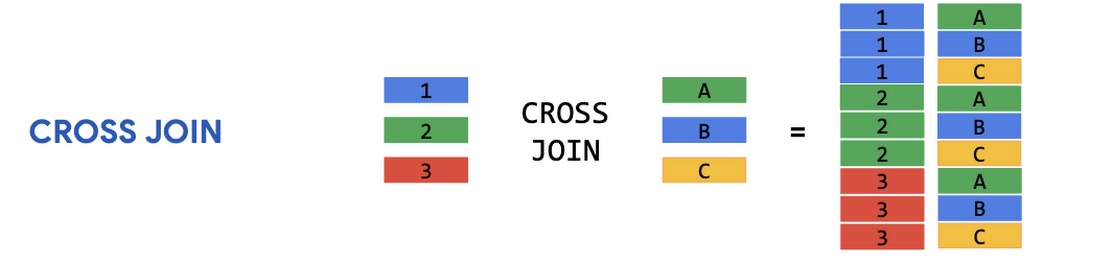
Example: Get all possible student-course combinations
SELECT
    students.first_name,
    students.last_name,
    courses.name AS course_name
FROM students
CROSS JOIN courses;
How it works:
- Every student is matched with every course
flowchart LR
    S[students] --> J[CROSS JOIN]
    C[courses] --> J
    J --> Result[(Final result-set: Cartesian product)]

    %% Style result set
    style Result fill:#fff3b0,stroke:#e0a400,stroke-width:2px

    %% Style join node
    style J fill:#e6f3ff,stroke:#4a90e2,stroke-width:1px,stroke-dasharray: 3 3

    %% Note
    noteN[["Every student is matched with every course.<br/>Rows = students × courses"]]
    Result --- noteN
- If we have 100 students and 10 courses, this returns 1,000 rows.
- Not commonly used unless explicitly needed.
- Can be dangerous if tables contain large numbers of rows!
View this query result
| first_name | last_name | course_name |
|---|---|---|
| Luuk | Wagner | Introduction to Programming |
| Luuk | Wagner | Data Structures and Algorithms |
| Luuk | Wagner | Database Management Systems |
| Luuk | Wagner | Operating Systems |
| … | … | … |
:arrow_right_hook: Self Join
A `SELF JOIN’ joins a table with itself using a join condition. It does not automatically produce a Cartesian product unless you omit the ON clause (which would then behave like a CROSS JOIN).
Example: Finding students from the same city
SELECT
    s1.first_name AS s1_first_name,
    s1.last_name AS s1_last_name,
    s2.first_name AS s2_first_name,
    s2.last_name AS s2_last_name,
    s1.city
FROM students s1
INNER JOIN students s2
    ON s1.city = s2.city
    AND s1.id <> s2.id;
How it works:
- The students table is joined with itself.
- Matches each student (s1) with other students (s2) from the same city (
s1.city = s2.city). - The condition (
s1.id <> s2.id) prevents matching a student with themselves.
flowchart LR
    S1[students alias s1] --> J[INNER JOIN ON s1.city = s2.city AND s1.id <> s2.id]
    S2[students alias s2] --> J
    J --> Result[(Pairs of students from the same city)]

    %% Style result set
    style Result fill:#fff3b0,stroke:#e0a400,stroke-width:2px

    %% Style join node
    style J fill:#e6f3ff,stroke:#4a90e2,stroke-width:1px,stroke-dasharray: 3 3

    %% Note
    noteN[["No Cartesian product.<br/>Only pairs matching the ON condition."]]
    Result --- noteN
View this query result
| s1_first_name | s1_last_name | s2_first_name | s2_last_name | city |
|---|---|---|---|---|
| Luuk | Wagner | Carmen | Lammers | Pijnacker-Nootdorp |
| Luuk | Wagner | Puck | Hoekstra | Pijnacker-Nootdorp |
| Luuk | Wagner | Daniel | van der Meer | Pijnacker-Nootdorp |
| … | … | … | … | … |
Real-World Considerations:
- INNER JOIN is the default choice for extracting accurate relationships.
- LEFT JOIN is great for auditing data (seeing missing connections).
- FULL JOIN isn’t always available in some databases (MySQL doesn’t support it natively).
- CROSS JOIN should be handled with caution due to potentially huge result sets.
- SELF JOIN is highly useful in social networks or employee management scenarios.
Conclusion
SQL joins aren’t just theoretical constructs; they’re powerful tools that shape data-driven decisions. Mastering them ensures efficient data retrieval, enhanced reporting, and strong relational database design.